Installing Applications on the Mac is Broken
When recently visiting my parents, my dad asked me to help him install Firefox on his Mac. He was able to download the application just fine, but actually installing it proved a bit more confusing. As far as he could tell, the application worked just fine after downloading, but mysteriously disappeared every time he restarted his Mac.
Another friend of mine dragged applications from mounted .dmgs to the Dock, thinking that would install them. Whenever she restarted her Mac and clicked on such an app, the Mac would mount the .dmg and launch the app from the mounted .dmg. She never realized anything was wrong, until she cleaned out her Downloads folder, and suddenly all of her apps stopped working.
Installing applications under Mac OS X is too confusing for many users.
How it used to be
Installing apps on a Mac used to be simple. In Mac OS 9 and earlier versions, you would typically download a StuffIt file. All Macs came with StuffIt Expander, which would open the .sit file, put the contained application or a folder with the application in its place, and remove the .sit file. You could then simply use the application right where it was, or you could move it somewhere else. That is not the case anymore.
How it is today
Apple probably realized that relying on a third-party application for installing apps was not a good idea. So they stopped bundling StuffIt Expander with Mac OS X. Instead, developers started using disk images to deliver downloadable applications. Nowadays, most Mac applications come on .dmgs. After the user downloads the application, Safari mounts the image. The user is then supposed to drag the application to the applications folder, unmount the image's volume and throw the .dmg to the Trash. This is too complicated and non-obvious. Most "normal" Mac users don't understand that the application on the mounted .dmg is not really on their system because they don't understand the concept of a disk image. They start the application from the mounted .dmg and end up confused when it disappears after a restart.
To fix this, developers have started adding instructions to the mounted dmg's window. Here's how's Adium's mounted image window looks:
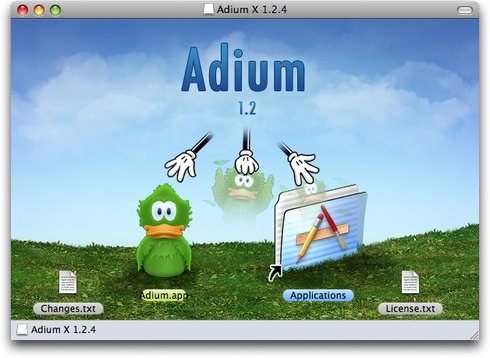
The picture is supposed to show the user that he should drag the Adium icon to the Applications icon (and then open that folder and launch the copied application). Of course, this is still too confusing for many users. Even worse, not all apps follow this model. Here is the mounted image window for the aforementioned Firefox:
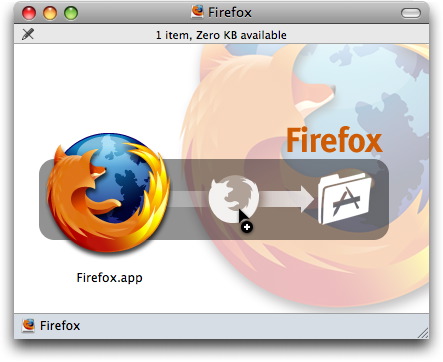
If you thought you could actually drag the Firefox icon to the Applications folder icon, well, no. The Application folder icon isn't actually an icon at all, it's part of the background image. The idea is that you open a second window and drag the Firefox icon to the second window's Applications folder. A lot of people never figure this out.
Some applications have now started alerting the user when they are launched from a mounted .dmg, asking whether they should move themselves to the Applications folder.
Some companies use actual installers. Google, for example, rolls its own installation mechanism. Adobe uses a third-party developer for its installers, which are often less than perfect. Some applications use what Apple confusingly calls "internet-enabled disk images." These are disk images which, upon double-clicking, replace themselves with their content and then move themselves to the Trash. Obviously, Apple saw the issue with disk images and tried to fix them, but only managed to create additional confusion.
Of course, Apple doesn't use any of these solutions. Apple generally delivers its software as .dmg files which contain packages which start Apple's own installer application. Windows can at least start an installer without making the detour of a mounted .dmg file.
All told, installing applications on the Mac has become inconsistent, confusing, and just plain broken. It's time for some kind of usable standardized consistent behaviour to emerge. Perhaps having the application work as its own installer, asking the user whether it should move itself to the Applications folder if it's launched from a .dmg (and afterwards ejecting the .dmg, and launching the installed application, as wel as optinally installing an icon in the Dock), would be a good first step.
Addendum: Michel Fortin, author of the excellent Sim Daltonism, a color blindness simulator which I use to test user interfaces for accessibility by color-blind people, has an article on the subject. His solution is to provide applications as downloadable ZIP files. Safari will open such files automatically, replicating how Mac OS used to work before OS X. This is a reasonable solution; the issue I see with this is that downloadable .dmg files have trained people to expect some kind of window showing the new application to open automatically. Downloadable ZIP files simply place the application in the downloads folder, where the user may then promptly forget about them.
Addendum 2: I've written a follow-up.
If you require a short url to link to this article, please use http://ignco.de/20