MacBook Pro 17" has Optional Anti-Glare Display
When Apple removed the option to have MacBook Pro notebooks with anti-glare coating, I complained about it. Yesterday, Apple reintroduced optional non-glossy screens for their 17" MacBook Pro. Apple writes:
And now you can choose a standard glossy display or an optional antiglare display, depending on your needs.
Thank you, Apple.
It seems this option is currently only available for the 17" version, but at least it's available again. It also costs 50 bucks, but in my opinion, it's worth every penny. Here's why:
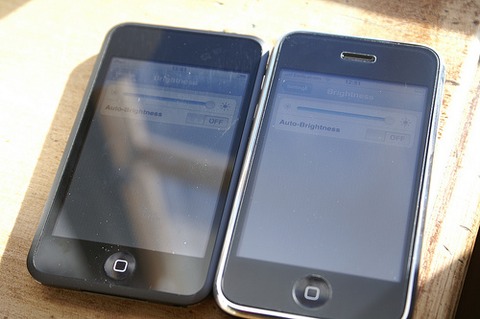
The picture on the left shows a plain iPod touch. The picture on the right shows an iPhone with an anti-glare screen protector. It's almost impossible to use a "plain" iPhone (or any device with a glossy screen) while, say, on a train. With the filter, or with a non-glossy display, it's not a problem at all.
So thanks again, Apple.
If you require a short url to link to this article, please use http://ignco.de/67