Unread Links
Recently, I got into a bit of a discussion with a visual designer. We were working on a website, and we couldn't agree on whether to have different colors for visited and unvisited links. Of course, good usability requires changing the color for visited links, and I personally find this feature extremely helpful when browsing the web. Sites without it are simply confusing.
However, visual designers tend to dislike having different colors for visited and unvisited links, since it introduces an additional color into their design and makes it hard to control how the site will look since visitors will pretty much randomly click on links.
Fortunately, it's possible to differentiate between visited and unvisited "things" without relying on color. A lot of applications do this. Gmail uses bold text for unread mails. Mail.app uses a little blue dot next to the message.

Most people are probably used to this concept. So instead of having different colors, we went with a blue dot, similar to what Mail.app has:
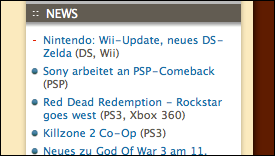
I think this may actually be more obvious than having a different color for visited links. It's very simple to implement in CSS:
a {
    padding-left: 20px;
    background-image: url(/media/unread.png);
    background-position: 4px 4px;
    background-repeat: no-repeat;
}

a:visited {
    background-image: url(/media/read.png);
}
Of course, this type of "unread" style doesn't work in all cases. For inline links, the blue dot we used may be too prominent; in those cases, a smaller, lighter picture would work better. But generally, I'm pretty happy with this solution, and so is the visual designer.
If you require a short url to link to this article, please use http://ignco.de/87