Virtual Keyboards: Aligning the Keyboard to your Hands
Gizmodo links to a Microsoft patent for a virtual keyboard which attempts to detect the position of your hands in order to align its keys to your fingers.
The virtual keyboard apparatus may include a touch-sensitive display surface configured to detect a touch signal including at least a finger touch and a palm touch by a hand of a user, and a controller configured to generate a virtual keyboard having a layout determined based at least in part on a distance between the detected palm touch and the detected finger touch.
This image shows which parts of your hands the device would detect, and how that information would be used to align the keyboard:
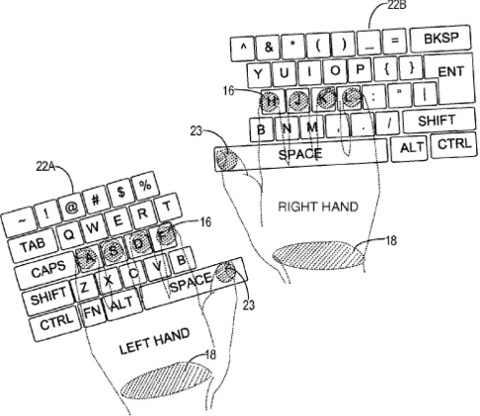
This is probably more usable than a static keyboard. However, it requires users to touch the screen with their wrists. It seems to me that this solution either doesn't recognize users moving their hands while typing (if they don't rest their wrists on the screen), or encourages users to adopt a harmful typing position (if they do rest their wrists on the screen).
I think a better solution would be to detect the floating hand above the screen, and figure out what the user is trying to type by looking at the whole hand. There are several way with which this can be achieved. Apple actually has a patent on one such solution:
The system would include the company's familiar capacitive touchscreen technology but would also introduce numerous infrared or similar sensors that can gauge the relative position of fingers, a whole hand or an outside object by measuring the differences in the light level at different points on the display.
If you require a short url to link to this article, please use http://ignco.de/189