Kindle: Buying Books by Accident
In the device's latest update, Amazon has given Kindle users the ability to organize books into collections. One way of adding a book to a collection is to open the book's menu, select "Add to Collection...", and pick a collection:
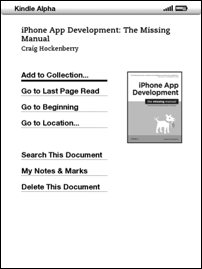
It's the default choice, so pretty quickly, you start selecting it automatically. Until you try to add a sample chapter to a collection:
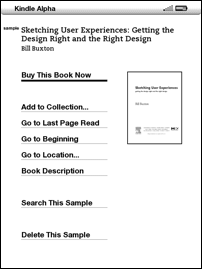
Suddenly, the default choice is "Buy This Book Now". I suspect I'm not the only one who bought a book by accident while organizing books into collections.1
This is exactly the kind of thoughtless interaction design that makes people afraid of using electronic devices. I'm quite sure nobody ever accidentally bought a book while organizing physical books on a bookshelf.
-
As somebody on Hacker News noted, I should point out that Amazon makes it really easy to get refunds. After ordering a book on the Kindle, you go to a confirmation screen, which allows you to retroactively cancel the order. In my particular case, though, I immediately realized that I had made a mistake after selecting "Buy This Book Now". Hoping that it would stop the Kindle from executing the order, I quickly hit "Home". This didn't stop the order, but it did prevent me from seeing the order confirmation screen. Of course, Amazon still refunded the book after I contacted them. The point of this article is not to imply that Amazon is somehow intentionally trying to trick people into buying books that can't be returned. Instead, I'm pointing out a very specific problem with the Kindle UI that could easily be solved by simply selecting the same default action for all types of documents. My point isn't that orders can't be refunded, but that accidental orders shouldn't occur in the first place. ↩︎
If you require a short url to link to this article, please use http://ignco.de/301